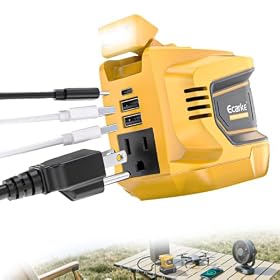
Best station for powering a router and lights only
For a router and a few LED lights, a compact portable power station is usually enough. Focus on usable watt-hours, continuous output, UPS behavior, and recharge options rather than maximum battery size.
A compact portable power station is usually the best fit for powering a router and a few LED lights during an outage. Most setups need relatively little power, so buying the largest station available can add unnecessary weight and cost. The key specifications are usable watt-hours, continuous AC output, pass-through or UPS behavior, and the ports needed for your equipment.
How much power do a router and lights need?
A typical home router may use roughly 5 to 20 watts, while an LED bulb commonly uses about 5 to 15 watts. Two LED lights and a router might therefore draw approximately 15 to 50 watts, depending on the equipment.
Check the wattage printed on each device or its power adapter. If an adapter lists volts and amps instead of watts, multiply them:
Volts × amps = watts
For example, a device rated at 12 volts and 1 amp uses approximately 12 watts. Actual power consumption can be lower than the adapter's maximum rating, but sizing from the listed rating gives you a safer estimate.
Capacity: how many watt-hours do you need?
Portable power station capacity is measured in watt-hours, or Wh. A simple runtime estimate is:
Runtime in hours = battery capacity in Wh × usable efficiency ÷ load in watts
Power stations lose some energy through the inverter and internal electronics, so do not assume that every rated watt-hour reaches your AC devices. For a quick estimate, use about 80% to 90% of the listed capacity as usable energy when running AC equipment, unless the manufacturer provides a more precise figure.
Examples using a 40-watt combined load:
A 200Wh station could provide roughly 4 to 4.5 hours.
A 500Wh station could provide roughly 10 to 11 hours.
A 1,000Wh station could provide roughly 20 to 22 hours.
Actual runtime varies with the station, battery age, inverter efficiency, router activity, light wattage, and whether the AC inverter is left on. If your devices can run directly from USB or DC output, avoiding the AC inverter may improve efficiency.
For short outages, a station in the roughly 200Wh class may be sufficient. For overnight operation or longer outages, a capacity in the roughly 500Wh range provides more practical reserve. Choose a larger battery if you want to add a modem, phone charging, a laptop, or more lights later.
Compact power station for short router and light outages
Product prices and availability are accurate as of the date/time indicated and are subject to change. Any price and availability information displayed on Amazon.com at the time of purchase will apply to the purchase of this product.
Continuous output and startup power
The station's continuous AC output must exceed the combined running wattage of the router and lights. A compact station with a few hundred watts of continuous output will generally have ample headroom for this use case, but confirm the specification before buying.
Startup surges are usually not a major concern for LED bulbs and routers. However, some lighting equipment, network devices, or power adapters can briefly draw more power when switched on. Leave reasonable headroom instead of sizing the inverter exactly to the calculated load.
Do not confuse continuous output with surge or peak output. Continuous output is the figure that matters for equipment running for minutes or hours.
Product prices and availability are accurate as of the date/time indicated and are subject to change. Any price and availability information displayed on Amazon.com at the time of purchase will apply to the purchase of this product.
AC outlets versus USB and DC ports
The simplest setup plugs the router and lamps into the station's AC outlets. This works with ordinary household plugs, but the station must run its AC inverter continuously.
USB-C, USB-A, or regulated DC outputs can be more efficient when your equipment supports them. Before using a DC cable or USB-C connection, verify:
The voltage matches the device's requirements.
The connector size and polarity are correct.
The port supplies enough current or wattage.
The cable is designed for that device.
A USB-C port is not automatically compatible with every router or lamp. Do not connect a router to an improvised cable simply because the plug fits. Use the device manufacturer's power requirements and a compatible cable or adapter.
Product prices and availability are accurate as of the date/time indicated and are subject to change. Any price and availability information displayed on Amazon.com at the time of purchase will apply to the purchase of this product.
Is a UPS feature important for a router?
If you need the internet connection to stay online during a brief power interruption, look for an uninterruptible power supply feature, often described as UPS or backup power. A station with this feature can keep connected equipment powered while utility power fails, depending on the manufacturer's stated transfer behavior and compatibility.
A basic portable power station without UPS functionality may still run the router during an outage, but you may need to start it and plug in the equipment after the power goes out. That can interrupt the connection.
UPS operation is not identical across all stations. Check the manual for:
Whether the AC output remains active while charging
Any restrictions on battery charge limits or long-term use
For a work-from-home setup, a dedicated UPS may be more appropriate for uninterrupted networking, while a portable power station is more useful when you also need portable energy or longer runtime.
Features worth prioritizing
Low-power display and controls
A clear display showing input, output, battery percentage, and estimated runtime makes it easier to manage a small load during an outage. A low-power mode can also help prevent the station from shutting down or wasting energy when the load is very small.
Recharge options
Wall charging is usually the fastest and simplest option before an expected outage. USB-C charging can be useful for topping up from another power source, while car charging helps when household power is unavailable. Solar charging is useful for extended outages, but panel compatibility depends on the station's input voltage, current, connector, and maximum solar input.
Fan noise
A station may run its cooling fan when the inverter is active or while charging. If it will sit in a bedroom or office, check the manufacturer's noise information if available and avoid placing it in an enclosed cabinet.
Battery chemistry and storage guidance
Battery chemistry affects weight, cycle life, and recommended storage practices. Follow the manufacturer's instructions for storage charge, temperature, ventilation, and periodic inspection. Keep the station dry and away from excessive heat.
A practical sizing method
Use this process before choosing a station:
List every device you want to run.
Record each device's rated wattage.
Add the wattages together.
Multiply the total by the number of hours you need.
Add a reserve for inverter losses and unexpected use.
Confirm that the station's continuous AC output exceeds the total load.
Check that its outlets and charging ports match your equipment.
For example, a router rated at 12 watts plus two 9-watt LED lamps creates a 30-watt load. Running that load for eight hours requires about 240Wh before losses. A station with substantially more than that amount of rated capacity would provide a more realistic overnight margin.
Common mistakes to avoid
Buying by inverter wattage alone: A high-wattage inverter does not mean the battery will run a small load for a long time.
Ignoring inverter losses: Rated battery capacity is not the same as usable AC energy.
Using oversized lamps: LED bulbs reduce the load significantly compared with incandescent bulbs.
Leaving unnecessary outputs active: Turn off unused AC, USB, or DC outputs when the station supports independent control.
Assuming every station works as a UPS: Verify the transfer behavior and pass-through limitations.
Using an incorrect router adapter: Match voltage, polarity, connector size, and current requirements.
Storing the station in extreme temperatures: Follow the manufacturer's storage limits.
When a different solution is better
A portable power station is a good choice when you want one battery to handle lights, networking equipment, phones, and occasional electronics. A dedicated UPS may be a better fit if your only priority is seamless protection for a router and other sensitive office equipment.
If you need to run a refrigerator, heater, pump, or other motor-driven appliance, size the station separately. Those appliances have substantially higher running and startup demands than a router-and-lights setup.
For a router and lights only, choose the smallest station that provides the required runtime with comfortable capacity and output headroom. A lighter unit with reliable UPS behavior may be more useful than a much larger model that is difficult to move or rarely needs its extra capacity.
FAQ
What size portable power station do I need for a router and two LED lights?
Start by adding the devices' rated wattages and multiplying the total by the required runtime. A combined load around 30 to 40 watts may need approximately 240 to 320Wh for eight hours before accounting for reserve and conversion losses, so a station with more rated capacity than that provides a safer margin.
Can a portable power station keep my router running during an outage?
Yes, if its battery has enough usable capacity and its output is compatible with the router's power adapter. For automatic switchover without a noticeable interruption, choose a model with a UPS or uninterruptible power supply feature and verify its transfer specifications.
Is it better to power a router from AC or USB?
AC is usually the simplest because it accepts the router's original adapter. USB or DC can be more efficient, but only use those connections when voltage, current, connector size, and polarity are confirmed to match the router.
How long will a 500Wh power station run a router and lights?
Runtime depends on the combined load and conversion efficiency. At a 40-watt AC load, a 500Wh station might provide roughly 10 to 11 hours using an 80% to 90% usable-energy estimate. Check the actual device wattages for a more accurate calculation.
Can I leave a portable power station plugged in as a router backup?
Only if the manufacturer supports that operating mode and specifies how pass-through charging or UPS operation works. Follow the manual's guidance on charge limits, ventilation, temperature, and long-term plugged-in use.