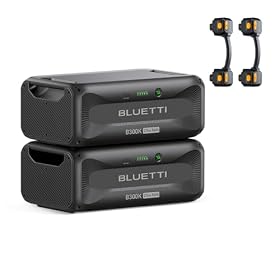
If your portable power station does not recognize its expansion battery, start with compatibility and cable checks, then verify power states, charge levels, firmware, and temperature before assuming the battery has failed.
An expansion battery that is not detected is usually caused by an incompatible battery, a loose or incorrect connection, a startup sequence issue, or a communication problem between the units. Turn both units off, confirm that the battery is approved for your power station, reseat the expansion cable, and restart the system before considering replacement.
Check compatibility first
Expansion batteries are not universal. Confirm all of the following in the power station and expansion-battery manuals:
The battery is designed for your exact power station series or model.
The battery capacity and voltage are supported.
The connection cable is the correct cable for that battery and power station.
The battery can be used with your power station's current firmware.
You have not exceeded the system's maximum number of expansion batteries.
A battery from the same brand may still be incompatible with a particular model. Do not force a connector or substitute a cable based only on its plug shape.
Reseat the expansion connection
Power the power station and expansion battery down before disconnecting or reconnecting anything, unless the manufacturer specifically permits hot-swapping.
Unplug the expansion cable from both units.
Inspect the plugs and ports for dust, bent contacts, moisture, or visible damage.
Check that the cable is the correct accessory and is not pinched or sharply bent.
Push both connectors in firmly until fully seated.
Make sure the cable is connected to the dedicated expansion-battery ports rather than an input, output, solar, or communication port.
Turn on the expansion battery first if the manual specifies that startup order; otherwise follow the manufacturer's sequence.
Turn on the power station and check its display or app.
Do not clean contacts with water or spray cleaner. If a port is wet, damaged, or loose, disconnect the equipment and let it dry completely before further use. A damaged connector should be inspected by the manufacturer or a qualified technician.
Product prices and availability are accurate as of the date/time indicated and are subject to change. Any price and availability information displayed on Amazon.com at the time of purchase will apply to the purchase of this product.
Verify the battery has power
Some expansion batteries will not communicate when their internal battery is completely depleted or when their protection system has shut them down. Check the battery's indicator lights or display separately from the power station.
If the battery appears empty:
Connect the approved charger or charging input according to the manual.
Allow the battery to charge for the time specified by the manufacturer.
Keep the battery within its stated operating-temperature range.
Avoid charging it immediately after exposure to extreme heat or cold.
If the battery shows no lights, display, or charging response with the correct charger and cable, stop repeated restart attempts. The battery may need service, or its protection circuit may be preventing operation.
Product prices and availability are accurate as of the date/time indicated and are subject to change. Any price and availability information displayed on Amazon.com at the time of purchase will apply to the purchase of this product.
Check the power station's settings and app
Some systems require expansion-battery detection to be enabled, or show the battery only in a device-information or energy-storage screen. Check for:
An expansion-battery enable or configuration setting
Record any error code before resetting the equipment. If an update is available, install it only with sufficient charge and stable power, following the manufacturer's instructions. Do not disconnect the battery during a firmware update unless instructed to do so.
Product prices and availability are accurate as of the date/time indicated and are subject to change. Any price and availability information displayed on Amazon.com at the time of purchase will apply to the purchase of this product.
Restart and reset carefully
A normal shutdown and restart can clear a temporary communication fault. Turn off connected loads, shut down both units, wait the period specified in the manual, and restart them in the recommended order.
Some manufacturers provide a reset procedure using a power button or button combination. Use only the documented procedure for your model. A reset may clear settings or require the battery to be configured again, so do not use undocumented button combinations.
Look for temperature or protection faults
An expansion battery may stop charging or communicating if it is too hot, too cold, over-discharged, or in another protective state. Move the equipment to a dry, well-ventilated location away from direct sun and heaters. Do not cool a hot battery with ice, water, or a refrigerator.
Stop using the battery if it is swollen, cracked, leaking, unusually hot, smoking, producing an odor, or making abnormal sounds. Disconnect it only if doing so is safe, keep it away from combustible materials, and contact the manufacturer or local emergency services as appropriate. Do not open the battery enclosure.
Isolate the failed component
If the system still does not detect the battery, narrow down the fault without repeatedly swapping unknown accessories:
Try the approved expansion cable, if you have a known-good replacement.
Check whether the power station detects another compatible expansion battery.
Check whether the suspect battery shows a normal status when connected to an approved compatible unit, if the manufacturer allows that test.
Confirm that the power station itself operates normally without the expansion battery.
Do not connect the battery to another device merely because the connector fits. If a different compatible battery works with the power station, the original battery or its cable is the likely problem. If no compatible battery is detected, the power station's expansion port, firmware, or internal communication circuit may need service.
When to replace the cable, battery, or power station
Replace the expansion cable when it has damaged insulation, bent connectors, intermittent operation, or visible corrosion—and use the manufacturer's specified replacement.
Contact the manufacturer for a battery replacement or warranty service when the battery remains unresponsive after approved charging, correct connection, a normal restart, and temperature normalization. Replacement is generally more reasonable than repair when the battery is swollen, physically damaged, or has a persistent protection fault.
A power station may need service when its expansion port is damaged, it fails to detect multiple known-compatible batteries, or the issue began after an electrical fault. Do not bypass battery-management electronics or attempt internal electrical repairs unless you are qualified and the manufacturer specifically authorizes the work.
FAQ
Why is my expansion battery not showing on the power station display?
The most common causes are incompatibility, a loose or incorrect expansion cable, a battery that is fully depleted or in protection mode, an incorrect startup sequence, or outdated firmware. Power both units down, reseat the approved cable, verify compatibility, and restart them according to the manual.
Can I use any expansion cable if the connector fits?
No. Connector shape does not confirm electrical or communication compatibility. Use only the cable specified for your power station and expansion battery.
Should the power station be on when I connect the expansion battery?
Follow the manufacturer's instructions. Many systems should be powered down before connecting or disconnecting an expansion battery, while some specify a particular startup order.
How do I know whether the battery or power station is faulty?
If an approved compatible battery works with the power station, the original battery or cable is more likely at fault. If the power station detects no known-compatible battery, its port, firmware, or internal electronics may need manufacturer service.
Is it safe to open an expansion battery to fix detection problems?
No. Do not open, bypass, or modify a lithium battery or its battery-management system. For a swollen, damaged, hot, leaking, or unresponsive battery, disconnect it if safe and contact the manufacturer or a qualified professional.