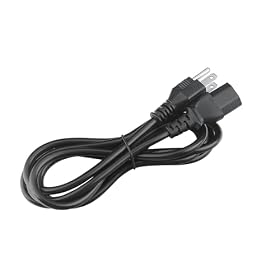
If your portable power station is not charging from the wall, check the outlet, AC charging cable, input settings, temperature, and charge limits before assuming the battery or inverter has failed.
If your portable power station is not charging from the wall, first confirm that the outlet and AC charging cable are working, then check the station’s charging mode, temperature, and battery settings. Many apparent charging failures are caused by a switched-off AC input, a loose connection, a full battery, or a protection mode. Disconnect everything except the wall charger while troubleshooting.
Check the outlet and charging cable first
Start with the simplest possible setup:
Plug a lamp or another small appliance into the wall outlet to confirm it has power.
If the outlet is controlled by a wall switch, turn the switch on.
Reset a tripped GFCI outlet or circuit breaker if appropriate.
Connect the power station directly to the wall outlet rather than through a power strip, extension cord, generator, or inverter.
Firmly reseat the AC cable at the wall and at the power station or charger brick.
Look for cuts, bent pins, melted plastic, discoloration, or a hot connector.
Do not use a damaged cable or charger. If the station uses a separate charging brick, check whether the brick has an indicator light and whether it becomes unusually hot. A light on the brick does not always prove that the station is receiving power, so also check the station’s display or input indicator.
Confirm the correct input and charging mode
Portable power stations commonly have separate controls for their AC outlets and their charging input. The AC output button may need to be off while the unit charges, while the input itself may have a separate control or menu setting.
Check the manual and display for:
An AC input or charging icon
Input wattage above zero
A charging timer or scheduled charging setting
A maximum charge percentage or battery-protection limit
A slow, silent, or low-power charging mode
An error code or temperature warning
If the screen shows AC input power but the battery percentage is not increasing, allow time for the charge level to update. The station may also be powering connected devices at the same time, which can make the battery percentage appear stationary. Disconnect loads during the test.
Product prices and availability are accurate as of the date/time indicated and are subject to change. Any price and availability information displayed on Amazon.com at the time of purchase will apply to the purchase of this product.
Let the power station return to a safe temperature
Charging may stop when the battery is too hot or too cold. Move the unit indoors to a dry area with normal room temperature, away from direct sunlight, heaters, enclosed vehicle interiors, and freezing conditions. Turn it off, unplug the charger, and let it sit until it reaches the temperature range specified in the manual.
Do not cool a warm power station with ice, water, or a refrigerator. Do not charge a unit that is swollen, leaking, cracked, wet, or giving off an unusual odor. Stop using it and contact the manufacturer if any of those conditions are present.
Product prices and availability are accurate as of the date/time indicated and are subject to change. Any price and availability information displayed on Amazon.com at the time of purchase will apply to the purchase of this product.
Check whether the battery is already full
A power station may stop drawing wall power when it reaches its charge limit. This is normal behavior, not necessarily a fault. Verify the displayed battery percentage and any custom charge limit in the app or control panel.
If the screen says 100% but the unit shuts off as soon as a load is connected, the display may be inaccurate or the battery may have a deeper problem. Avoid repeatedly forcing charge cycles. Follow the manufacturer’s instructions for calibration or battery reset if that procedure is explicitly supported.
Look for a protection shutdown or error code
The charging circuit can shut down after an input surge, overheating event, abnormal voltage, or internal fault. Record any code or warning shown on the display before resetting the unit.
A safe general reset is:
Turn off connected appliances and the power station.
Unplug the wall charger.
Wait several minutes.
Reconnect the charger directly to a known-good outlet.
Turn the station on only if the manual requires it for charging.
Do not open the case or bypass a protection feature. Portable power stations contain high-energy batteries and capacitors that can remain hazardous even when the display is off.
Inspect the charging port and connections
With the charger unplugged, examine the charging port using a flashlight. Check for dust, debris, looseness, pushed-in contacts, or signs of heat damage. Do not insert metal tools into the port and do not spray cleaner into it.
If the connector feels loose, only charges when held at an angle, or disconnects when the cable is moved slightly, stop stressing the port. The cable plug or the station’s input socket may be damaged.
Also confirm that the charger is connected to the correct input. Some models have separate ports for AC charging, solar input, car charging, and expansion batteries. A plug that physically fits another port may still have the wrong voltage or polarity.
Verify charger compatibility before replacing it
A replacement charger must match the power station’s required input specifications and connector. Depending on the model, important details may include:
Output voltage
Maximum charging current or wattage
Connector size and polarity
AC input range
Whether the charger is a dedicated adapter or a standard power cord
Use the original charger when possible. If it is lost or defective, buy a replacement identified for the exact power station model, or confirm every specification with the manufacturer. Do not substitute a laptop charger, random USB-C adapter, or higher-wattage power supply simply because the plug fits. An incompatible charger can damage the station or create a fire and shock hazard.
Test with the station’s other charging methods
If your model supports solar or car charging, those methods can help narrow down the problem, but they do not prove that the wall charger is safe to replace blindly.
If solar and car charging work but AC charging does not, the wall charger, AC cable, outlet path, or AC input circuit is the likely area of concern.
If no charging method works, the issue may involve the battery-management system, input board, battery, or a locked protection state.
If the station accepts AC power only intermittently, suspect a cable, connector, port, overheating, or internal charging circuit problem.
Use only charging equipment approved for the station. Solar panels and car cables have their own voltage and current limits, so do not connect them as a substitute unless the manual lists the setup as compatible.
When the power station needs service or replacement
Contact the manufacturer or an authorized service center when:
A known-good outlet and compatible charger produce no input reading
The unit repeatedly displays an input, battery, or temperature fault
The charging port is loose, burned, or physically damaged
The battery is swollen, leaking, cracked, or unusually hot
The unit was exposed to water, a major surge, or reverse-polarity connection
Charging stops immediately even after a cool-down and reset
A replacement charger or cable is reasonable when the original has visible damage, its indicator fails, or the manufacturer confirms it is faulty. A replacement power station is more reasonable when the unit has a failed internal charging circuit, severe battery damage, or repair costs that approach the value of a new unit. Do not attempt an internal battery or charger repair unless you are qualified and the manufacturer explicitly supports it.
FAQ
Why does my portable power station show AC input but not charge?
It may be powering connected devices, enforcing a charge limit, updating its battery estimate slowly, or protecting itself from excessive temperature or an electrical fault. Disconnect all loads, check the charge limit, let the unit reach room temperature, and look for an error code.
Can I use any AC charger with a portable power station?
No. The replacement charger must match the exact model’s required voltage, current or wattage, connector, and polarity. Use the original charger or one approved for that model.
Why does my power station charge from solar but not from the wall?
The AC cable, wall adapter, outlet path, AC input port, or internal AC charging circuit may be faulty. Test the wall setup with a known-good outlet and the correct charger, then contact the manufacturer if the station still shows no AC input.
Is it safe to charge a power station overnight?
Only if the manufacturer permits unattended or overnight charging and the unit is in good condition. Place it on a hard, dry, ventilated surface, keep it away from flammable materials, and stop using it if it becomes swollen, damaged, unusually hot, or gives off an odor.