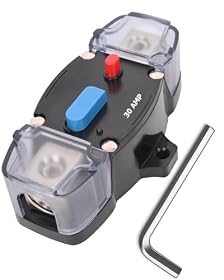
A blown DC input fuse may be replaceable if it is in an accessible external holder, but many portable power stations use internal protection that should not be opened or bypassed. Here is how to identify the fault and choose a safe replacement.
A portable power station may stop charging through its DC input because of a blown fuse, tripped breaker, damaged cable, poor connection, or an internal fault. First identify whether the protection device is an accessible external fuse or breaker. If it is inside the power station, do not open the case or bypass it; follow the manufacturer’s service instructions or use an authorized repair provider.
Identify the type of protection
External inline fuse
An inline fuse is usually located in a fuse holder on the charging cable, near the battery or power source. The holder may twist open, slide apart, or contain a replaceable blade, glass, or cartridge fuse.
Only replace it with a fuse that matches the original:
The same current rating
A DC-rated fuse suitable for the system voltage
The same physical type and size
The correct fast-acting or time-delay characteristic, if specified
The fuse protects the cable and circuit from excessive current. Installing a higher-rated fuse can allow the cable or input circuit to overheat.
Resettable DC breaker
A breaker may have a small toggle, push-to-reset button, or lever. Turn off the charging source, correct any overload or wiring problem, and reset it only as described by the manufacturer. A breaker that trips again should not be held on, repeatedly reset, or replaced with a larger breaker.
Use a breaker specifically rated for DC. An AC-only breaker is not automatically safe on a DC circuit because DC arcs can be harder to interrupt.
Internal protection
Many portable power stations do not have a user-accessible input fuse or breaker. Protection may be mounted inside the unit or controlled electronically by the battery-management system. Do not remove the housing, bridge the fuse with wire or foil, or install a substitute part based only on its physical appearance. Opening the unit can expose high-energy battery circuits and may create shock, fire, or warranty risks.
Check the charging setup before replacing anything
Work through these checks with the power station and charging source turned off or disconnected.
1. Inspect the cable and connectors
Look for crushed insulation, bent pins, loose plugs, corrosion, discoloration, or heat damage. Check that the connector is fully inserted and that the cable is the correct type for the station’s DC input. Do not assume that two plugs with the same size have the same voltage, polarity, or pin arrangement.
A damaged cable should be replaced rather than repaired with tape or an improvised connector.
2. Check the source and polarity
Confirm that the solar panel, vehicle outlet, adapter, or other source is producing the voltage and current permitted by the power station. Stay within the input limits printed on the unit or listed in its manual. Excess voltage can damage the charging circuit; insufficient voltage may look like a blown fuse because charging never begins.
For solar charging, output can also fall because of shade, clouds, a dirty panel, or a loose extension connection. For vehicle charging, check whether the outlet is live only when the ignition is on and whether its own fuse has opened.
If measuring voltage, use a properly rated meter and follow the meter and power-station instructions. Do not probe unfamiliar connectors or short the contacts.
3. Check for an accessible fuse or breaker
Trace the charging cable from the source toward the power station. If you find an external fuse holder, disconnect both ends before opening it. Replace only a visibly blown fuse with the exact manufacturer-specified type and rating. Some fuses do not show obvious damage, so a continuity check is useful only if you know how to use a meter safely.
If you find a resettable breaker, remove the charging load before resetting it. If it trips immediately again, stop troubleshooting until the cause is identified.
4. Check for an overload or short
Disconnect extra cables, adapters, splitters, and third-party accessories. A shorted extension cable, incorrect adapter, or damaged connector can blow a fuse as soon as the source is connected. Reconnect the system one component at a time using the approved configuration.
Do not substitute a fuse with a nail, foil, wire, or another conductive object. Do not install a breaker simply because the original fuse is inconvenient to replace.
5. Consider temperature and protection shutdowns
A power station may refuse DC charging when it is too hot or too cold, when the battery is full, or when its battery-management system has detected an abnormal condition. Let the unit reach the operating temperature specified by the manufacturer, disconnect the source, and try the documented reset procedure.
A display error code can help distinguish a normal protection shutdown from an input-circuit failure. Record the code before cycling the unit.
Product prices and availability are accurate as of the date/time indicated and are subject to change. Any price and availability information displayed on Amazon.com at the time of purchase will apply to the purchase of this product.
Choosing a replacement fuse or breaker
Buy a replacement only after identifying the original specification or confirming it with the manufacturer. Match the current rating exactly unless the manufacturer gives a different approved value. Also match the fuse or breaker’s voltage rating, DC suitability, interrupt rating, terminal style, and physical dimensions.
For an external cable fuse, the cable’s gauge and length also matter. The protection device must protect the weakest part of the circuit, not merely accommodate the power station’s maximum input. If the original part is unlabeled or inaccessible, contact the manufacturer instead of guessing.
A generic automotive fuse may not be an acceptable substitute for a fuse designed for a higher-voltage DC system. Likewise, a household breaker or AC-rated component may not safely interrupt the circuit.
Product prices and availability are accurate as of the date/time indicated and are subject to change. Any price and availability information displayed on Amazon.com at the time of purchase will apply to the purchase of this product.
When replacement is not the right repair
Stop and arrange service if:
The fuse blows again immediately
The breaker trips repeatedly
The input port is loose, burned, melted, or discolored
The power station smells hot or chemical, swells, hisses, or becomes unusually hot
There is no external protection device and the unit will not accept charging
The replacement specification cannot be verified
A repeat failure usually indicates a short, damaged cable, incorrect source voltage, failed input component, or battery-management fault. Replacing the fuse repeatedly can turn a protective warning into equipment damage or a fire hazard.
A replacement charging cable or external fuse holder is reasonable when the original accessory is clearly damaged and the new part’s connector, polarity, voltage, current rating, and wiring are confirmed. A replacement power station may make more sense when the input port or internal charging circuit has failed, repair is unavailable, or the unit has suffered heat or physical damage. Follow the manufacturer’s instructions and use a qualified technician for internal battery or mains-related repairs.
FAQ
Can I replace the fuse inside a portable power station?
Usually not without manufacturer approval. Many units have internal electronic or battery protection, and opening the case can expose hazardous circuits. Replace only an accessible external fuse or use an authorized repair service.
Can I use a higher-amp fuse so it does not blow again?
No. A higher-rated fuse may allow excessive current through the cable or charging circuit, creating overheating or fire risk. Use the exact specified rating and investigate why the original failed.
Can I replace a DC fuse with a circuit breaker?
Only if the manufacturer specifies a compatible DC-rated breaker for that circuit. A breaker is not a universal substitute, and an AC-only breaker may not safely interrupt DC current.
Why does the DC input fuse keep blowing?
Common causes include a shorted or damaged cable, incorrect polarity, excessive source voltage, an incompatible adapter, a damaged connector, or a failed input circuit. Disconnect the system and stop replacing fuses until the cause is found.
Is a portable power station safe to open for fuse replacement?
Treat it as unsafe unless the manufacturer provides a specific service procedure. Battery packs can deliver very high fault current, and internal repairs should be handled by qualified personnel.