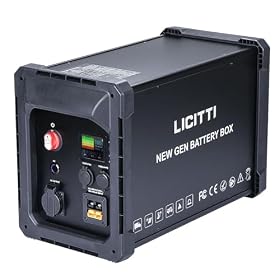
If the USB ports on your portable power station work but the AC outlets do not, the battery and DC section may still be operating while the AC inverter is disabled, overloaded, overheated, or faulty. Try these checks before replacing the unit.
USB ports can continue working when the AC outlets are disabled because portable power stations usually use separate DC and AC output circuits. The most common causes are that AC output is switched off, the inverter is overloaded, the battery is too low, or the unit has entered a protection mode.
Check the AC output first
Press the power button labeled AC, AC Output, or Inverter. On many power stations, pressing the main power button alone does not activate the AC outlets. Look for an AC icon, wattage display, or indicator light confirming that the inverter is running.
Then disconnect every device from the AC outlets and switch AC output off and back on. If the outlets work with nothing connected, reconnect devices one at a time. A high-startup-load appliance, such as a refrigerator, pump, heater, or power tool, may trigger overload protection even when its normal running wattage appears acceptable.
Reduce the load and check the battery
Read the station's display for an overload, temperature, or low-battery warning. Remove anything that is not essential and try a small AC load, such as a low-wattage lamp or charger.
A power station may keep USB output available after it disables the inverter to protect the battery. Recharge the unit to a level recommended in its manual, then try AC output again. Some models also shut down AC output automatically when the remaining charge is low or when the inverter's low-voltage cutoff is reached.
Do not assume that a device's label tells the whole story. Motors and compressors can draw several times their running wattage when starting. This is especially important for refrigerators, freezers, pumps, and power tools. The power station must support both the appliance's continuous wattage and its startup demand.
Product prices and availability are accurate as of the date/time indicated and are subject to change. Any price and availability information displayed on Amazon.com at the time of purchase will apply to the purchase of this product.
Inspect the connections and setup
With AC output turned off, check the outlet area and plug for:
A partially inserted plug
Debris, moisture, or visible damage
A loose or damaged receptacle
A power strip or extension cord that may be switched off
An adapter or cable with a blown fuse or poor connection
Test the appliance from a known-good household outlet if practical. Also try a different small AC device with the power station. If one appliance works but another does not, the issue may be the appliance, its startup demand, or its cord rather than the power station.
Do not use a wet or damaged power station. Keep ventilation openings clear, and do not operate the unit inside a closed vehicle, cabinet, or other space where heat can build up.
Solar charging option for a replacement power station
Product prices and availability are accurate as of the date/time indicated and are subject to change. Any price and availability information displayed on Amazon.com at the time of purchase will apply to the purchase of this product.
Reset protection modes
Turn off all connected loads and shut down the power station completely. Disconnect its charger and any solar or vehicle input, wait several minutes, and restart it. Then activate AC output before connecting a small load.
If the unit was hot, let it cool fully first. An inverter can disable itself because of overheating while USB output remains available. Avoid repeatedly restarting it while it is hot or overloaded.
Some models have a dedicated reset procedure, circuit breaker, or AC-output reset control. Follow the manufacturer's instructions rather than pressing unknown recessed buttons or opening the case. Never bypass a fuse, breaker, or protection feature.
When the inverter may have failed
The AC section may need service if all of these are true:
AC output is enabled according to the display or indicator.
The battery is adequately charged.
No overload, temperature, or fault warning remains.
The unit has been restarted with all loads disconnected.
A small, known-good AC device still receives no power from any outlet.
USB operation does not prove that the AC inverter, AC wiring, receptacles, or internal protection components are healthy. Do not open the power station or attempt internal electrical repairs unless you are specifically qualified and the manufacturer permits it. Lithium battery packs and high-voltage inverter components can present shock, fire, and injury hazards.
Contact the manufacturer if the unit is under warranty and provide the model, fault code, battery level, connected load, and steps already tried. If repair is unavailable or the inverter has failed, replacing the power station is usually more practical than attempting an unsupported repair. Choose a replacement based on continuous AC wattage, startup or surge capability, battery capacity, outlet type, and the manufacturer's support for the appliances you need to run.
USB ports normally use the power station's DC output circuit, while AC outlets use a separate inverter. The DC circuit can keep working even when the inverter is switched off, overloaded, overheated, or faulty.
Can a low battery disable only the AC outlets?
Yes. AC conversion generally uses more power than USB output, so a power station may disable the inverter at a low battery level while continuing to provide limited DC output.
Why will my refrigerator not run even though the power station shows AC output?
A refrigerator can require a high surge of power when its compressor starts. Check the power station's continuous and surge ratings against the refrigerator's requirements. A station that handles the running wattage may still fail to handle startup demand.
Should I open a portable power station if the AC outlets remain dead?
No. Internal lithium batteries and inverter components can be hazardous, and opening the case may create a fire or shock risk and void the warranty. Use the manufacturer's service process or replace the unit if it is not repairable.