A solar panel’s advertised wattage is a laboratory maximum, so lower readings are often normal. Use this step-by-step checklist to find whether the loss comes from sunlight, connections, battery settings, or equipment limits.
A portable power station can show much less solar input than the wattage printed on a panel, especially outside ideal midday conditions. Panel ratings are measured under standardized laboratory conditions, while real-world output is reduced by sunlight angle, shade, heat, cable losses, battery charge level, and the power station’s input limit. Check the simple physical causes first, then confirm the electrical specifications and test for a faulty component.
What the panel rating actually means
A panel’s rated wattage is usually its maximum output under Standard Test Conditions (STC). Those conditions assume a specific amount of sunlight, a cell temperature of 25°C (77°F), and a favorable test setup. Your panel may produce less when the sun is low, the panel is hot, the sky is hazy, or the panel is not aimed directly at the sun.
For example, a panel labeled 200 watts will not necessarily deliver 200 watts to a power station. The station may receive substantially less even when the panel and power station are working correctly.
The power station also has a maximum solar-input rating. If its solar input limit is lower than the panel or panel array’s potential output, the station will cap the incoming power rather than accept the full panel rating.
Check sunlight, shade, and panel angle first
Small amounts of shade can cause a large reduction in output, particularly with portable folding panels connected in a series configuration. Check for shade from:
Trees, railings, vehicles, tents, and buildings
Dirt, leaves, snow, or water spots on the panel surface
A fold, crease, or section of a folding panel that is not fully opened
Shadows crossing even part of one panel
Move the panel into unobstructed sunlight and point it toward the sun. Adjust the angle every so often as the sun moves. A panel lying flat may produce less than one tilted toward the sun, depending on the time of day and location.
Clouds and haze can also reduce output sharply. Test again during brighter sunlight before concluding that the panel or power station is defective.
Product prices and availability are accurate as of the date/time indicated and are subject to change. Any price and availability information displayed on Amazon.com at the time of purchase will apply to the purchase of this product.
Inspect the cable and connectors
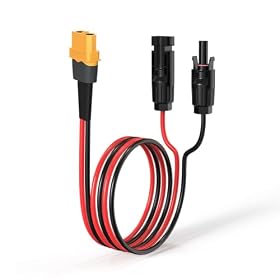
A loose, damaged, or unsuitable cable can reduce solar input or stop charging altogether. With the power station’s solar input disconnected, inspect:
The panel’s output cable and any extension cable for cuts, crushed sections, bent contacts, or heat damage.
Every connector for dirt, moisture, corrosion, or an incomplete connection.
Adapter polarity and connector type against the panel and power station manuals.
Extension-cable length and wire size, since long or undersized cables can cause voltage drop.
Any splitter or combiner for the correct wiring arrangement.
Push compatible connectors together fully, but do not force a connector or use an adapter simply because it fits physically. Keep connections dry and follow the manufacturer’s instructions for connecting or disconnecting the system.
If removing an extension cable makes the input rise, the cable or one of its connectors may be causing excessive loss. Replace a visibly damaged cable rather than repairing a solar connector with improvised wiring.
Product prices and availability are accurate as of the date/time indicated and are subject to change. Any price and availability information displayed on Amazon.com at the time of purchase will apply to the purchase of this product.
Confirm the panel array is wired correctly
When using two or more panels, series and parallel connections affect voltage and current differently:
Series wiring adds voltage while current stays roughly similar.
Parallel wiring adds current while voltage stays roughly similar.
The final voltage and current must remain within the portable power station’s solar-input voltage and current ranges. Exceeding the maximum voltage can damage equipment, while voltage that is too low may prevent the station from charging effectively.
Check the panel and power station manuals before changing the wiring. Do not assume that panels with similar wattage can be connected safely; their voltage, current, connector polarity, and electrical characteristics also matter.
Product prices and availability are accurate as of the date/time indicated and are subject to change. Any price and availability information displayed on Amazon.com at the time of purchase will apply to the purchase of this product.
Check the power station’s input limit and charging status
Look up these specifications for the power station:
Maximum solar-input watts
Operating voltage range
Maximum solar-input voltage
Maximum solar-input current
Whether the solar input uses MPPT or another charge-controller configuration
If the panel array can produce more power than the station accepts, the station will limit the reading. This is normal and does not mean the panel is underperforming.
A nearly full battery can also reduce or stop solar input. Some power stations taper charging as the battery approaches full, and the display may show little or no input even with strong sunlight. Test with the battery at a lower state of charge, if practical and safe, and check whether the station has a separate AC, car, or solar charging mode selected.
Also check for an input warning, overvoltage warning, temperature warning, or charging pause on the display. Let an overheated power station or panel cool in a safe, ventilated location before testing again.
Product prices and availability are accurate as of the date/time indicated and are subject to change. Any price and availability information displayed on Amazon.com at the time of purchase will apply to the purchase of this product.
Consider temperature and panel orientation
Solar panels generally produce less power when their cells become hot. Bright sun can therefore produce lower output than expected if the panel is sitting on a hot roof, vehicle hood, or dark surface. Place it where air can circulate underneath, if the manufacturer permits that setup.
Cold weather can increase panel voltage. This matters when panels are wired in series because the array’s open-circuit voltage can rise in low temperatures. Stay below the power station’s maximum solar-input voltage under all expected conditions, not just the panel’s normal operating voltage.
Test one component at a time
If the output remains unusually low, isolate the system without opening the panel or power station:
Disconnect extra panels, splitters, and extension cables.
Connect one known-compatible panel directly to the power station.
Test in unobstructed, strong sunlight with the battery well below full.
Compare the reading with and without the extension cable.
If possible, test the same panel and cable with another compatible charge controller or power station.
Test other panels individually rather than relying on the combined reading.
A single panel or cable that causes the output to fall points to that component or its connection. If every compatible panel produces abnormally low input under the same clear conditions, the power station’s solar-input circuit may be the problem.
Do not short the panel leads, probe live connectors casually, or open the power station. Solar panels can produce hazardous voltage in sunlight, and internal battery and inverter components should be serviced only by qualified personnel.
When to replace a cable, panel, or power station
Replace a cable or adapter when it has damaged insulation, overheated connectors, corrosion, intermittent operation, or an incorrect rating. A replacement panel is reasonable when its output remains low in strong, unobstructed sunlight after the cable and power station have been ruled out, particularly if the panel has cracked glass, delamination, burn marks, or physical damage.
Consider warranty service or replacement of the power station when its solar input stays abnormally low with multiple known-compatible panels and cables, the input port is loose or damaged, or it repeatedly reports an input fault. Keep the model’s voltage and current limits in mind when choosing replacement equipment; a higher-wattage panel is not automatically compatible or useful if the power station’s input controller caps the array.
FAQ
Is it normal for a 200-watt solar panel to produce less than 200 watts?
Yes. The rated wattage is a laboratory maximum. Sun angle, clouds, shade, dirt, heat, cable losses, battery charge level, and the power station’s input limit can all reduce the displayed input.
Can shade reduce solar input by more than the shaded area suggests?
Yes. Depending on the panel’s cell layout and whether panels are wired in series, partial shade can reduce the output of a larger section or the entire array.
Why does solar input drop when the power station is nearly full?
Many power stations taper or stop charging as the battery approaches full. Test with the battery at a lower state of charge and check the station’s display and manual for charging behavior.
Is a higher-wattage solar panel always better for a portable power station?
No. The panel or array must stay within the power station’s solar-input voltage, current, and wattage limits. Exceeding the maximum voltage can damage the equipment, while excess wattage may simply be capped.