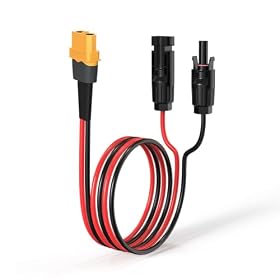
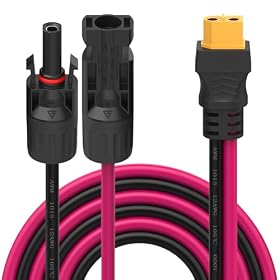
A portable power station may not activate its MPPT solar controller when weak sunlight does not provide enough startup voltage or usable input power. Check the panel arrangement, connectors, cable, shading, and charging settings before assuming the power station has failed.
A portable power station’s MPPT solar input may not wake on a cloudy morning because the panels are producing too little voltage or power to cross the controller’s startup threshold. Cloud cover, shade, a long or damaged cable, loose connectors, and an unsuitable panel arrangement are the most common causes. Start with the simple checks below before blaming the MPPT hardware.
What “MPPT not waking” usually means
An MPPT controller tracks the panel’s changing voltage and current to extract useful solar power. However, it cannot begin tracking until the solar input reaches the power station’s required operating range.
On a bright day, a panel may easily provide enough input to start charging. Under heavy cloud, the same panel can produce substantially less usable power. The open-circuit voltage may still look normal, but the voltage can fall when the power station tries to draw current. If the input remains below the unit’s startup requirement, the display may show zero watts or no solar input at all.
This behavior does not automatically indicate a failed controller.
Check the panel and sunlight first
Remove shade and reposition the panel
Look for partial shade from trees, buildings, railings, roof edges, or even a nearby cable. A small shaded section can reduce output much more than expected, especially with panels wired in a series arrangement.
Move the panel into the brightest available area and aim it toward the open sky. On a cloudy day, direct bright sky exposure is preferable to a location that is partly shaded, even if the panel appears generally outdoors.
Confirm the panel type and arrangement
Make sure the panel’s electrical output is compatible with the portable power station’s solar input. The important specifications usually include:
Solar input voltage range
Maximum solar input current
Maximum solar input wattage
Required startup or operating voltage, if listed
Connector and polarity information
A single low-voltage panel may work in strong sun but fail to wake the MPPT controller in weak light. Conversely, connecting panels in series can raise voltage but may exceed the power station’s maximum input voltage. Do not exceed the limits printed in the power station manual.
Panels in parallel generally increase available current while keeping voltage similar. Panels in series generally increase voltage while current stays closer to the level of one panel. The correct arrangement depends on the power station’s input limits and the panel specifications.
Product prices and availability are accurate as of the date/time indicated and are subject to change. Any price and availability information displayed on Amazon.com at the time of purchase will apply to the purchase of this product.
Inspect the cable and connectors
Disconnect the solar cable from the power station and inspect both ends. Check for:
Connectors that are not fully seated
Bent, recessed, or damaged contacts
Cuts, crushed sections, or heat damage on the cable
Water or dirt inside connectors
An adapter with the wrong polarity or connector type
Reconnect everything firmly, following the order and connector instructions in the manual. If possible, try a known-compatible solar cable. A high-resistance, damaged, or excessively long cable can cause enough voltage drop to keep the MPPT input below its wake-up point, particularly in cloudy conditions.
Do not force connectors together or bypass a fuse, polarity protection device, or other safety component. If a connector is hot, discolored, melted, or smells burnt, disconnect the system and replace the damaged part before using it again.
Product prices and availability are accurate as of the date/time indicated and are subject to change. Any price and availability information displayed on Amazon.com at the time of purchase will apply to the purchase of this product.
Check the power station’s charging settings
Some power stations will not accept solar input in every operating state. Check that:
The unit is powered on if the manufacturer requires this for solar charging.
The solar or DC input is enabled.
A low-temperature, overvoltage, overcurrent, or other protection warning is not displayed.
The battery is not already full or restricted by a charge limit.
The correct input port is being used.
Any app-based charging schedule or battery-protection setting is not blocking input.
If the display is frozen or the input appears inactive after the solar conditions improve, follow the manufacturer’s approved restart procedure. Avoid repeatedly connecting and disconnecting cables while the panel is generating power unless the manual permits it.
Product prices and availability are accurate as of the date/time indicated and are subject to change. Any price and availability information displayed on Amazon.com at the time of purchase will apply to the purchase of this product.
Consider temperature and battery state
Cold weather can reduce panel output, and a cold battery may cause the power station to limit or pause charging. Let the unit and battery reach the operating temperature specified by the manufacturer. Do not charge a battery that is outside its permitted temperature range.
A nearly full battery can also reduce or stop charging. Check the battery percentage and charge-limit settings before diagnosing the solar controller.
Test under stronger sunlight
If the MPPT input is inactive only on cloudy mornings but begins charging later in brighter conditions, the system may simply be operating below its startup threshold. This is especially likely when using one small panel, a long cable, partial shade, or a panel with a voltage close to the power station’s minimum input.
For a useful comparison, leave the setup unchanged and check it during the brightest part of the day. If solar input appears then, review the panel wattage, voltage, shading, and cable length rather than replacing the power station immediately.
A basic multimeter can help an experienced user compare the panel’s voltage with the solar input range, but measure only if you understand the panel arrangement and the meter’s limits. Series-connected panels can produce hazardous voltages, and incorrect probing can short a connector or damage equipment. Follow the panel and power station manuals, or have a qualified person perform the measurement.
When the MPPT controller may actually be faulty
The power station may need service if all of these conditions are true:
The panel is in strong, unobstructed sunlight.
The panel voltage and wattage are compatible with the power station.
The cable and connectors are known to be good.
The correct input port and charging settings are being used.
The battery is within its permitted temperature and charge range.
The unit still shows no solar input with another compatible panel or cable.
Before requesting service, record the panel specifications, weather conditions, cable and adapter setup, battery percentage, displayed warnings, and whether the input works at any other time. This information can help distinguish a normal low-light limitation from an input or controller fault.
Do not open the power station or attempt to repair the MPPT circuitry yourself. Portable power stations contain high-energy batteries and capacitors that can remain hazardous even when the display is off.
When to change the setup instead
If the system works in bright sun but routinely fails on cloudy mornings, the practical solution may be a better-matched solar array rather than a replacement power station. Depending on the manufacturer’s limits, that could mean using a compatible higher-output panel, reducing cable losses, eliminating shade, or using an approved series or parallel arrangement.
The added panels must remain within the portable power station’s maximum voltage, current, and wattage limits. More panels are not automatically safer or faster if they exceed the input specifications.
FAQ
Why does my portable power station charge from solar later in the day but not in the morning?
Morning light is often weaker and the panel may be shaded or at a poor angle. The solar input may remain below the MPPT controller’s startup threshold until sunlight becomes stronger. Check for shade, cable voltage drop, and panel compatibility.
Can a cloudy day prevent an MPPT controller from starting?
Yes. Heavy cloud can reduce usable panel power enough that the input voltage falls below the controller’s operating or startup range. The controller may begin working when brighter sunlight returns.
Should I connect two solar panels in series to wake the MPPT input?
Only if the power station manual allows that arrangement and the combined open-circuit voltage remains below the unit’s maximum input voltage. Series wiring raises voltage, but exceeding the input limit can damage the power station.
How can I tell whether the solar panel or power station is the problem?
Check the setup in strong sunlight with compatible equipment. Inspect connectors and try a known-good cable or panel if available. If the input remains inactive despite correct voltage, settings, temperature, and connections, contact the manufacturer rather than opening the unit.